The viewing area of web is always unpredictable and because of that web designers has to keep in mind few factors before they call their site "complete":
1) Operating System (Windows, Mac)
2) Screen Resolution (800 x 600, 1024 x 768, 1440 x 900)
3) Browser with various version (IE 6.0, IE 7.0, Firefox, Safari)
Showing posts with label User Centric Design. Show all posts
Showing posts with label User Centric Design. Show all posts
Friday, June 27, 2008


Thursday, June 19, 2008
Usability Methods (User Centric Methodologies)
Usability methods are also known as a User Centric Methodologies.
Every user interface can be evaluated using below mentioned usability methods:
- Cognitive Walkthrough
- GOMS (Goals, Operators, Methods and Selection Rules)
- Prototypes (from Low Fidelity to High Fidelity)
- Usability Inspection
- User Testing
- Focus Groups and
- Task Analysis
Depending upon the situation one can use the combination of methods. The selection of method majorly based upon:
- Time constraints
- Relevancy to project
- Implementation Cost
Wednesday, April 30, 2008
Wireframe vs. Prototype
Just read few post on IxDA forum about "Wireframe vs. Prototype".
Few of the straight forward and very clear answer were:
1) I consider a wireframe a type of prototype.
If the type of prototype has active interactive functions I call it"interactive prototype".
Prototype > Non-Active Functionality > WireframePrototype > Active Functionality > Interactive Prototype
- by Daniel
2) It is all about the notion of the fidelity of the prototype. A low fidelity prototype would be a straightwireframe. Adding more functionality like clickable regions, navigation andcss raises the fidelity. Backing a prototype with data to simulate a processalso raises the fidelity.
- by Peter Uchytil
Few of the straight forward and very clear answer were:
1) I consider a wireframe a type of prototype.
If the type of prototype has active interactive functions I call it"interactive prototype".
Prototype > Non-Active Functionality > WireframePrototype > Active Functionality > Interactive Prototype
- by Daniel
2) It is all about the notion of the fidelity of the prototype. A low fidelity prototype would be a straightwireframe. Adding more functionality like clickable regions, navigation andcss raises the fidelity. Backing a prototype with data to simulate a processalso raises the fidelity.
- by Peter Uchytil
Friday, August 17, 2007
Cognitive walkthrough
It is a usability Testing strategy in which a developer group systematically evaluates each element on every screen in the context of the various tasks (e.g. How likely would a user click this button for Task A? What would happen if they did? etc.).
[Source - HFI]
The Cognitive Walkthrough method is a usability inspection method used to identify usability issues in a piece of software or web site, focusing on how easy it is for new users to accomplish tasks with the system. The method is rooted in the notion that users typically prefer to learn a system by using it to accomplish tasks, rather than, for example, studying a manual. The method is prized for its ability to generate results quickly with low cost, especially when compared to usability testing, as well as the ability to apply the method early in the design phases, before coding has even begun.
A cognitive walkthrough starts with a task analysis that specifies the sequence of steps or actions required by a user to accomplish a task, and the system responses to those actions. The designers and developers of the software then walkthrough the steps as a group, asking themselves a set of questions at each step. Data is gathered during the walkthrough, and afterwards a report of potential issues is compiled. Finally the software is redesigned to address the issues identified.
[Source - Wikipedia.org]
[Source - HFI]
The Cognitive Walkthrough method is a usability inspection method used to identify usability issues in a piece of software or web site, focusing on how easy it is for new users to accomplish tasks with the system. The method is rooted in the notion that users typically prefer to learn a system by using it to accomplish tasks, rather than, for example, studying a manual. The method is prized for its ability to generate results quickly with low cost, especially when compared to usability testing, as well as the ability to apply the method early in the design phases, before coding has even begun.
A cognitive walkthrough starts with a task analysis that specifies the sequence of steps or actions required by a user to accomplish a task, and the system responses to those actions. The designers and developers of the software then walkthrough the steps as a group, asking themselves a set of questions at each step. Data is gathered during the walkthrough, and afterwards a report of potential issues is compiled. Finally the software is redesigned to address the issues identified.
[Source - Wikipedia.org]
Wednesday, August 01, 2007
CUA Exam Experience
 Here are the list of few things that I have experienced during CUA Exam:
• be calm and relax
• Carry all the BIG books with proper "post it" attached to each section and few important chapters too, so you can quickly go through the pages.
• You can avoide carrying Study Guide, Glossary & Exercise books.
• Quick Reference pages will be helpful too.
• Give attention to "FALSE", "TRUE" and "EXCEPT" word in the question.
• If you have any doubt while answering, choose the best option and then FLAG it, so it will considered as your answer even incase you submit it in a hurry.
• Even if you have little bit of doubt, flag it and refer to your notes.
• Spare 10-12 mins in the end for PRP section, its high scoring section and easy one.
• UT section was a bit tough, it was more on factical questions where you need to apply your judgement, it takes more time.
http://www.prashantpoladia.com/
Saturday, July 28, 2007
CUA Exam Cleared

Hurayyyyyyyy !!!
Just cleared CUA™ (Certified Usability Analyst) Exam of HFI.
Sincere thanks to all of you, special thanks to Chirutha Dalal and Bhooshan Pandya for sharing their exam experience with me.
I am very much excited now, but yes, it do not stops here. I need to start implementing it in real world which would be much more difficult than giving exam.
Please do share your experience with me regarding Usability Implementation in your organization.
Monday, July 23, 2007
Power of GUI on iPhone

See how Powerful UI of product/application can make a difference and make it usable to 1 year old baby.
Saturday, July 21, 2007
HFI's Usability Course » June 2007 Batch

Recently, I have attended HFI's Usability Course from 18th June '07 to 28th June '07 (10 Days). It has changed my vision of designing web pages and application interfaces.
It has improved my thought process before designing anything and now it became the habit of asking myself :
• "WHY"... why I am designing this way and not the other way?
• Will this be useful for the actual user and serve their purpose?
• Will this be user friendly and easy to understand?
• Will they be able to complete their task successfully?
• Will this satisfy users?
and many more...
My experience througout the course was excellent and my take home from this course were:
• User's Conceptual Model (their needs and behaviour)
• Industry Standards related to Designs
• Design Principles
• User Centric Analysis Process
• Importance of Usability Testing throughout product development
• How to put Research into Practice
• How to design effective websites & web applications
and many more ...
Topics of HFI's Usability Courses are:
• User Centric Analysis and Conceptual Model (3 Days)
• The Science and Art of Effective Web & Application Design (3 Days)
• Practical Usability Testing (2 Days)
• Putting Research into Practice (2 Days)
I strongly recommend this course for designers to attend it.

Friday, July 13, 2007
Certified Usability Analyst exam's paper pattern and guidelines
Recently, I had a talk with Chirutha Dalal about CUA (Certified Usability Analyst) exam. As I got few useful information about it, here I am noting down few DO's and DONT's for the exam and paper pattern as per what she explained me:
• Exam will be devided in 4 sections
• Each section will be having few set of questions (UCD-26, Design-38, UT-26, PRP-10)
• No Negative Marking
• 70 % passing score
• Suggestive time to spent on each section will be mentioned
• prepare separate notes or stick yellow notes on given material for easy reference
• Objectives type of Questions (Choose answer from 1-4)
• Can't Jump from one section to another (Sequential Navigation :) )
• Can Jump from one question to another within that section (Persistent Menu :))
• Questions will be more of scenario based and need to apply your experience
• Can flag a question to get back to it again
• Got to attend sections in form of (1 >> 2 >> 3 >> 4)
• Once a particular section submited can't go back to previous one (very important)
• Research Section (4th) is the easiest one so, spare 10-12 mins for it and you can score high
• go through given Study Guide thoroughly
I hope this would be useful.
Wednesday, July 04, 2007
User Centric Design at Glance
 [Source - businessinnovationinsider]
Following is the process to accomplish User Centric Design approach.
- Design Strategy
• To understand Stake Holder's Goals and Expectations
• To gather background information - Profiles and Personas
Collect various profiles of:
• User Profiles
• Environmetal Profiles
• Task Profiles - Data Gathering
To collect data by way of:
• Interviews
• Contextual Inquiry
• Focus Groups
• Surveys & Questionnaires - Scenarios and Task Analysis
• Scenarios to use across design life cycle
• Define Task Steps - Primary Nouns
• "Things" user take action on or manipulate
• It needs to be obvious on pages - Information Architecture
• Labelling Systems
• Categorical Schemes
• Hybrid Schemes
• Hierarchical Organisation
Monday, June 25, 2007
Course II - The Art and Science of Effective Web and Application Design, HFI

One another course completed with HFI (Course II - The Art and Science of Effective Web and Application Design). It was good course to attend as it gives clear understanding on how one should design the website and application by keep in mind the user's mental model.
Shortly, i will write more about it!!! Do share your comments.
Wednesday, June 20, 2007
User Centered Analysis and Conceptual Design - HFI Course

Just completed 3 days (18th Jun - 20th June) course on User Centered Analysis and Conceptual Design of Human Factors International conducted by Abhijit Thosar at Residential Hotel. It was really wonderful experience to know about "users", their behaviour, their mental models.
I will write more about it shortly.
Thursday, June 14, 2007
HFI’s 10-days 4 part Usability Training Program (Myself attending Jun ‘07 Batch)
 Luckily at the last moment I got a chance to attend June Batch of HFI’s 10-days 4 part Usability Training Program (18th June -to- 28th June).
These courses are designed to gear up participants to become certified Usability analyst.
1) User-Centered Analysis and Conceptual Design (UCA) – 3 Days
2) The Science and Art of Effective Web Design (Design) – 3 Days
3) Practical Usability Testing (UT) – 2 Days
4) Putting Research into Practice (PRP) – 2 Days
Once I will be through with these courses, I will post my experience over here.
For enquiry of above courses for next batch contact Archana.
Archana Saraf
Senior Marketing Support Executive
Human Factors International
Ph: 91 – 22 - 40107400
Cell : 9324233477
For enquiry of above courses for next batch contact Archana.
Archana Saraf
Senior Marketing Support Executive
Human Factors International
Ph: 91 – 22 - 40107400
Cell : 9324233477
email : archana@humanfactors.com
Thanks,
Prash
Thursday, May 03, 2007
Design Standards - when can it be in place?
When can a company/individual put the standard in place (as per my understanding)
• (most important) if they have will to implement the standards
• If they have appropriate resources in place
• If they have proper plan in place
• If they have right staff in place
• (most important) if they have will to implement the standards
• If they have appropriate resources in place
• If they have proper plan in place
• If they have right staff in place
Wednesday, November 01, 2006
Unit of Measurement
Below mentioned information will be useful for designers and developers which has been picked up from elementK's training files on CSS:
Unit of Measurement
pixels (px)
A standard screen measurement. One pixel equals one physical pixel on a computer screen, which varies with screen resolution. (For this reason, some consider pixels to be a relative unit of measurement.)
inches (in)
A standard English measurement. One inch is equal to 2.54 centimeters.
centimeters (cm)
A standard metric measurement. One centimeter is equal to almost 2/5 of an inch.
millimeters (mm)
A standard metric measurement. Ten millimeters are equal to one centimeter.
points (pt)
A standard print measurement. One point is equal to 1/72 of an inch. In reality, point values are not this precise on the Web, and vary according to the font face in use.
picas (pc)
A standard print measurement. One pica is equal to 12 points.
===========================
If you intend to use absolute units of measurement for any CSS property, pixels tend to be the most reliable across different browsers and operating systems. Pixels also make the most sense for the screen. Points and picas, for example, are units of print measurement that have no real meaning on a computer screen.
If you want your length values to scale from user to user, and from one output device to the next, use relative units of measurement. The following table lists the relative units of measurement in CSS.
Unit of Measurement
ems (em)
A standard print measurement. Ems are relative to the width of the uppercase M character of the parent element's font, or the inherited font size when applied to the font-size property.
x-height (ex)
A standard print measurement. The x-height is defined by the size of the lowercase x character of the parent element's font, or the size of the x character of the inherited font size when applied to the font-size property.
percent (%)
A fraction value based on the computed value of an inherited length.
Unit of Measurement
pixels (px)
A standard screen measurement. One pixel equals one physical pixel on a computer screen, which varies with screen resolution. (For this reason, some consider pixels to be a relative unit of measurement.)
inches (in)
A standard English measurement. One inch is equal to 2.54 centimeters.
centimeters (cm)
A standard metric measurement. One centimeter is equal to almost 2/5 of an inch.
millimeters (mm)
A standard metric measurement. Ten millimeters are equal to one centimeter.
points (pt)
A standard print measurement. One point is equal to 1/72 of an inch. In reality, point values are not this precise on the Web, and vary according to the font face in use.
picas (pc)
A standard print measurement. One pica is equal to 12 points.
===========================
If you intend to use absolute units of measurement for any CSS property, pixels tend to be the most reliable across different browsers and operating systems. Pixels also make the most sense for the screen. Points and picas, for example, are units of print measurement that have no real meaning on a computer screen.
If you want your length values to scale from user to user, and from one output device to the next, use relative units of measurement. The following table lists the relative units of measurement in CSS.
Unit of Measurement
ems (em)
A standard print measurement. Ems are relative to the width of the uppercase M character of the parent element's font, or the inherited font size when applied to the font-size property.
x-height (ex)
A standard print measurement. The x-height is defined by the size of the lowercase x character of the parent element's font, or the size of the x character of the inherited font size when applied to the font-size property.
percent (%)
A fraction value based on the computed value of an inherited length.
Thursday, July 27, 2006
Human Factors International - offers courses for being Usability Experts
 Few days ago I was complaining to myself that WHY INDIA DO NOT HAVE ANY INSTITUTIONS FOR HCI [Human Computer Interaction] in INDIA. When I met Aadesh and Bhooshan, I came to know about really an interesting thing about Institute for Human Computer Interaction and that also in Mumbai [Bandra].
It came to me as a surprise that it's there in India. The name of the institute is "Human Factors International Inc". I visited their site that is http://www.humanfactors.com/ and seems to be very interesting to me. My friends who have attended these classes told me that it is really an amazing stuff to attend even if you have immense knowledge in Usability, it just change the way you look at the things in terms of usability.
That statement made me eager to know more about it and now I am planning to go for it in near future.
If you people know any other institutes in India, who offers such courses on usability, please, let me know.
Tuesday, June 06, 2006
Stages of Design Process
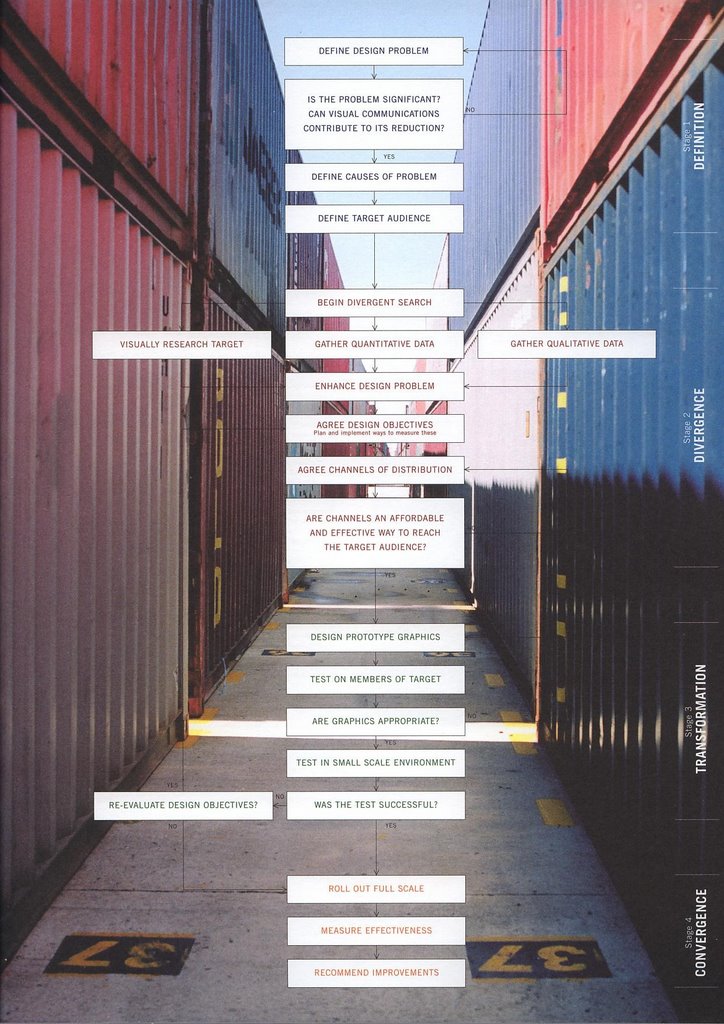 This is an interesting stuff about "Stages of Design Process". The above diagram has been picked up from the book "Visual Research" of Ian Noble and Russel Bestley.
It talks about the 4 stages involve in design process based on their research.
1st - Difinition
2nd - Divergence
3rd - Transformation
4th - Convergence
Starting from 1st stage of "Definition" where Design problems are defined and the appropriate data gathered after agreeing on design objectives in the 2nd stage of "Divergence". Once the objectives are all set, prototypings are prepared and they are evaluated in stage 3 of "Transformational". If the tests were not successful revaluation of design objectives takes place. At the final stage of "Convergence", effectuve measures are checked and improvements are recommended.
The book talks more about an introduction to research methodologies in graphic design. The subjects covered are INVESTIGATION, ANALYSIS, SYNTHESIS, COMMUNICATION, EXPERIMENTATION, AUDIENCE, CRAFT, PRODUCTION, MATERIALS, SYSTEMS, METHOD, PROCESS, SEMIOTICS, SEMANTICS, RHETORIC and DESIGN.
Tuesday, May 16, 2006
Guidelines for Usability Designers

Few questions which needs to be answered before designing the User Interface for an application are:
1) Who are the users? Their age group? Their Specific Location (if any)?
2) Will user be trained before they will use the application?
3) How much automated task should be provided and how much left for the user?
4) Will the application be shown on other gadgets like PDA and Mobile? 5) How much compatible it should be.
5) Will the machines needs to be remembered few tasks?
Few things which should be included:
1) Ease of Navigation
2) Consistency need to be followed
3) Help Section
4) Error messages should be specific
5) Helpline Number to solve the query quickly.
6) Standard look of icons and an option to show Icon and Text together.
7) Search functionality
8) Differentiate links from normal text (best would be to underline it)
After designing the application few stuff which needs to be checked are:
1) Can user really be able to complete task?
2) How easy it was?
3) Do they require more training and support files?
4) Keep testing
Let me know if i have missed anything.
Tuesday, April 25, 2006
Heuristic Evaluation

Heuristic evaluation is a discount usability engineering method for quick, cheap, and easy evaluation of a user interface design.
Heuristic evaluation is the most popular of the usability inspection methods. Heuristic evaluation is done as a systematic inspection of a user interface design for usability. The goal of heuristic evaluation is to find the usability problems in the design so that they can be attended to as part of an iterative design process. Heuristic evaluation involves having a small set of evaluators examine the interface and judge its compliance with recognized usability principles (the "heuristics").
Now, your immediate question would be... "How do i conduct the Huristic Evaluation?"... right?
So, Conduct a heuristic evaluation.
Monday, April 24, 2006
Prototyping
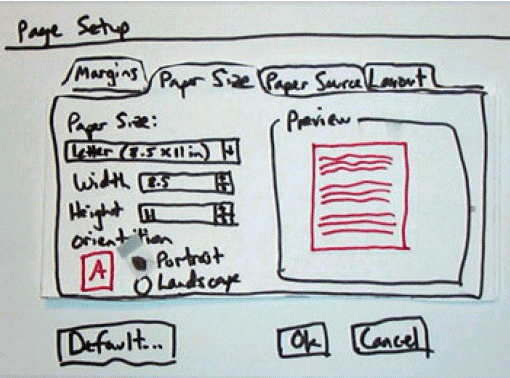
Prototyping is the process of quickly putting together a working model (a prototype) in order to test various aspects of the design, illustrate ideas or features and gather early user feedback. Prototyping is often treated as an integral part of the development process where it is believed to reduce project risk and cost.
Often one or more prototypes are made in a process of incremental development where each prototype is influenced by the performance of previous designs, in this way problems or deficiencies in design can be corrected. When the prototype is sufficiently refined and meets the functionality, robustness, manufacturability and other design goals, the product is ready for production.
Source : en.wikipedia.org
Subscribe to:
Posts (Atom)